Inbetriebnahme der Pixy 2.1 mit Simulink: Unterschied zwischen den Versionen
Zur Navigation springen
Zur Suche springen
| (7 dazwischenliegende Versionen desselben Benutzers werden nicht angezeigt) | |||
| Zeile 164: | Zeile 164: | ||
|- | |- | ||
|} | |} | ||
= SPI laut MathWorks= | |||
[[Datei:Simulink Pixy2 SPI.jpg|thumb|rigth|300px|Abb. 9: Simulink Modellparameter]] | |||
[[Datei:Simulink_Pixy2_SPIwithCS.jpg|thumb|rigth|300px|Abb. 10: Einstellungen des Simulink Pixy2-Blocks SPI with CS]] | |||
[[Datei:PixyMonSPI.jpg|thumb|rigth|300px|Abb. 11: Einstellungen des PixyMon v2 v3.0.24 für SPI]] | |||
[[Datei:Kein Ergebnis Pixy2.jpg|thumb|rigth|300px|Abb. 12: Keine Daten werden angezeigt.]] | |||
{| class="wikitable" | |||
|+ style="text-align:left;"| Tabelle 2: SPI Verbindung Pixy2 10P mit Arduino Uno R3 | |||
|- | |||
! Pin !! Pixy 2.1 10P !! Arduino Uno R3 | |||
|- | |||
| 1 || SPI MISO || D12 | |||
|- | |||
| 2 || 5 V VCC || 5 V | |||
|- | |||
| 3 || SPI SCK || D13 | |||
|- | |||
| 4 || SPI MOSI || D11 | |||
|- | |||
| 6 || GND || GND | |||
|- | |||
| 7 || SPI SS || D10 | |||
|} | |||
Error: | |||
Pixy2 vision sensor supports bit order of 'MSB first' and SPI mode 3. Change the values in the 'SPI properties' of the Hardware board settings and retry. | |||
Lösung siehe Abb. 9 | |||
Folgende Einstellungen wurden getroffen | |||
* Einstellungen des Simulink Pixy2-Blocks SPI with CS siehe Abb. 10 | |||
* PixyMon siehe Abb. 11 | |||
Das Ergebnis (keine Daten) ist in Abb. 12 zu sehen. | |||
= Dokumentation = | = Dokumentation = | ||
Aktuelle Version vom 2. Dezember 2025, 11:15 Uhr

| Autor: Prof. Dr.-Ing. Schneider |
Software Vorbereitung
Installieren Sie folgende Software
- Simulink Coder
- Simulink Support Package for Arduino Hardware
- PixyMon v2 3.0.24
Hardware Verbindung mit Originalkabel (ISCP)
 Originalartikel: Hooking up Pixy to a Microcontroller


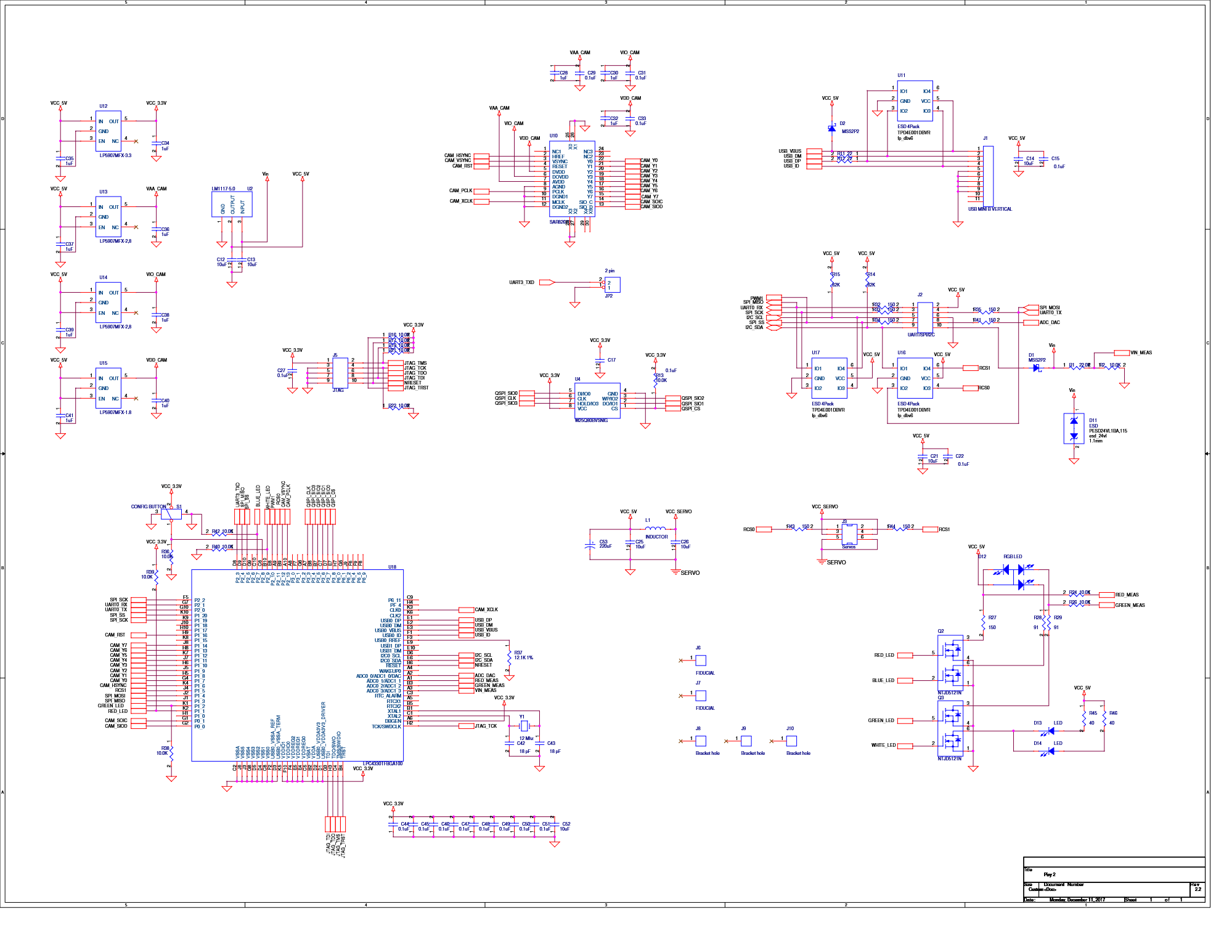
Steckerbelegung an der Pixy 2.1 (10P)
1  2
3  4
5  6
7  8
9  10
Die Verbindung der Pixy 2 mit dem Arduino erfolgt über das mitgelieferte 6-adrige Flachbandkabel (vgl. Abb. 2 und 3).
| Pin | Pixy 2 | Arduino ICSP |
|---|---|---|
| 1 | SPI MISO, UART RX, GPIO0 | SPI MISO |
| 2 | 5 V | VCC |
| 3 | SPI SCK, DAC OUT, GPIO1 | SPI SCK |
| 4 | SPI MOSI, UART TX, GPIO2 | SPI MOSI |
| 5 | I2C SCL | Reset |
| 6 | GND | GND |
| 7 | SPI SS, ADC IN, GPIO3 | |
| 8 | GND | |
| 9 | I2C SDA | |
| 10 | GND |
Problem: SPI SS (10P) ist mit Pin 5 des Arduino ICSP nicht verbunden.
| Pin | Arduino ICSP |
|---|---|
| 1 | SPI MISO |
| 2 | VCC |
| 3 | SPI SCK |
| 4 | SPI MOSI |
| 5 | Reset |
| 6 | GND |
I2C Verbindung


| Pin | Pixy 2 | Arduino Uno R3 |
|---|---|---|
| 1 | SPI MISO, UART RX, GPIO0 | |
| 2 | 5 V | VCC, 5 V |
| 3 | SPI SCK, DAC OUT, GPIO1 | |
| 4 | SPI MOSI, UART TX, GPIO2 | |
| 5 | I2C SCL | SCL |
| 6 | GND | |
| 7 | SPI SS, ADC IN, GPIO3 | |
| 8 | GND | |
| 9 | I2C SDA | SDA |
| 10 | GND | GND |
SRC
Datei:LineTrackingI2C R2025a.zip
DemoLineTrackingI2C.ino
|
#include <Pixy2I2C.h>

Pixy2I2C pixy; // Instanz erzeugen

void setup() {
  Serial.begin(115200);
  Serial.println("Serieller Monitor mit 115200 Baud gestartet...");
  delay(1000);

  int r = pixy.init();  // Pixy2 starten (I2C automatisch)
  Serial.print("pixy.init(): ");
  Serial.println(r);
  Serial.println("Pixy Init ...");
  delay(500);

  int result = -1;
  for (int i = 0; i < 10; i++) {      // 10 Verbindungsversuche
    result = pixy.changeProg("line");
    Serial.print("changeProg try ");
    Serial.print(i);
    Serial.print(": ");
    Serial.println(result);

    if (result >= 0) {
      Serial.println("Pixy2 Line Tracking gestartet..."); // Erfolgreicher Start
      delay(1000);
      break;
    }
  }
}
void loop() {
  int8_t Ergebnis_u8 = pixy.line.getMainFeatures();

  if (Ergebnis_u8 <= 0) {
    Serial.println("Keine Linie gefunden.");
    delay(100);
    return;
  }
  // Hauptlinie (featureType = LINE_VECTOR)
  if (pixy.line.numVectors) {
    Serial.print("Linie gefunden: ");
    Serial.print("x0=");
    Serial.print(pixy.line.vectors[0].m_x0);
    Serial.print("  y0=");
    Serial.print(pixy.line.vectors[0].m_y0);
    Serial.print("  x1=");
    Serial.print(pixy.line.vectors[0].m_x1);
    Serial.print("  y1=");
    Serial.println(pixy.line.vectors[0].m_y1);
  }
  delay(50);
}
URL: https://svn.hshl.de/svn/Informatikpraktikum_1/trunk/Arduino/ArduinoLibOrdner/Pixy2/examples/DemoLineTrackingI2C/ |
SPI laut MathWorks


| Pin | Pixy 2.1 10P | Arduino Uno R3 |
|---|---|---|
| 1 | SPI MISO | D12 |
| 2 | 5 V VCC | 5 V |
| 3 | SPI SCK | D13 |
| 4 | SPI MOSI | D11 |
| 6 | GND | GND |
| 7 | SPI SS | D10 |
Error:
Pixy2 vision sensor supports bit order of 'MSB first' and SPI mode 3. Change the values in the 'SPI properties' of the Hardware board settings and retry.
Lösung siehe Abb. 9
Folgende Einstellungen wurden getroffen
- Einstellungen des Simulink Pixy2-Blocks SPI with CS siehe Abb. 10
- PixyMon siehe Abb. 11
Das Ergebnis (keine Daten) ist in Abb. 12 zu sehen.
Dokumentation
→ zurück zum Hauptartikel: Kamerasensor_Pixy_2.1